Up through Windows 8, the Recycle Bin is just what it is—a container for your deleted files. However, in Microsoft Windows 11 and 10, you can force the Recycle Bin to behave in several new and valuable ways.
You can change the Recycle Bin’s maximum size, set it to automatically clean itself after a number of days, or bypass the Recycle Bin while discarding files. This tutorial will explain how to perform these three actions on any Windows 11 or 10 machine.
How to Change the Maximum Size of the Recycle Bin
The Recycle Bin in Windows 11 and 10 has a default storage space of around 5% of the total size of your disk volume. With that in mind, let’s assume you’ve assigned 500 GB of space to your volume. For this volume, the Recycle Bin will automatically delete your oldest files when over 25 GB of space has been used.
For most users, 5% is more than enough space in the Recycle Bin. However, you may be in the middle of an OCD-induced cleaning session where you want to be extra careful that anything you delete isn’t gone forever. In that case, you may consider changing the maximum size of the Recycle Bin.
To do so, right-click the Recycle Bin icon on your desktop and choose Properties. If you don’t have the icon on your desktop, open the Start menu, search Windows for desktop icons, and select the Themes and related settings option. On this window, scroll down to Desktop icon settings.
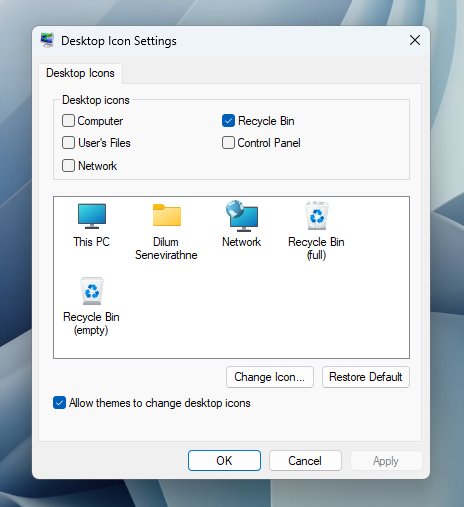
Here, you’ll be able to restore the icon to your desktop.
The Properties window of your Recycle Bin will allow you to set a custom maximum size for each volume.
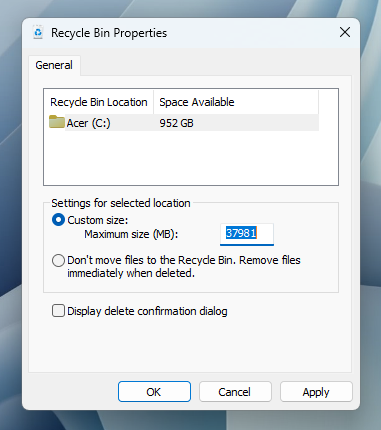
By selecting the Custom size radio option, you can enter a maximum size, in megabytes (1,024 megabytes equals one gigabyte), that the Recycle Bin can grow to before files begin to delete permanently.
How to Bypass the Recycle Bin and Delete Files Permanently
If the Recycle Bin is useless in your workflow, you can set the default action for file deletions to completely bypass the Recycle Bin and delete permanently.
You can do so in that same Properties menu when you right-click the Recycle Bin icon on the Windows 11 or 10 desktop.